
BEEP OUT
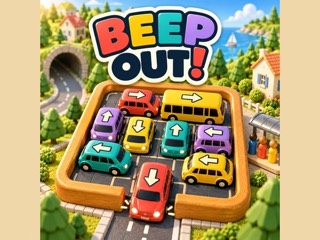
BEEP OUT turns a toy-town traffic jam into a puzzle. Every vehicle wears an arrow on its roof, and tapping it sends it that way. Free the board by choosing the right order, clearing blocked lanes, pairing vehicles with waiting passengers and handling limited parking spaces. There are 30 levels, and undo and hint buttons are ready when a jam gets stubborn.
How to play BEEP OUT
- Click or tap a vehicle and it moves along its roof arrow.
- On a keyboard, pick a vehicle with the arrow keys and send it with Enter.
- Open up blocked lanes and match passengers to vehicles.
- Keep an eye on the parking spaces.
- Undo, Hint and Restart are on hand.
Tips
- Think about the order of moves before sending a car.
What we saw when we played BEEP OUT
When we opened BEEP OUT on October 15, 2026, on a desktop browser, it loaded to a bright title screen. The BEEP OUT! logo sits at the top in chunky letters of coral, yellow, teal, purple and navy, with the tagline "Little cars. Big satisfaction." on a dark ribbon beneath it. Behind the logo is a low-poly toy town seen from above at an angle: rows of rounded green trees, pink blossom trees, cream walls, a tunnel at each side of a gray road, and two small cars, one red and one yellow, waiting at a crossing in the middle.
Along the bottom of the screen are four buttons. A large red Play button is on the left, followed by white Levels and Garage buttons and a round gear button for settings. The Levels button suggests you can pick stages directly rather than only playing them in order, and Garage points to vehicles you can look at or change. The scene is tidy and readable, which matters in a game where you need to see which way each car's roof arrow points before you tap it. We took this screenshot on the title screen and did not start a level.
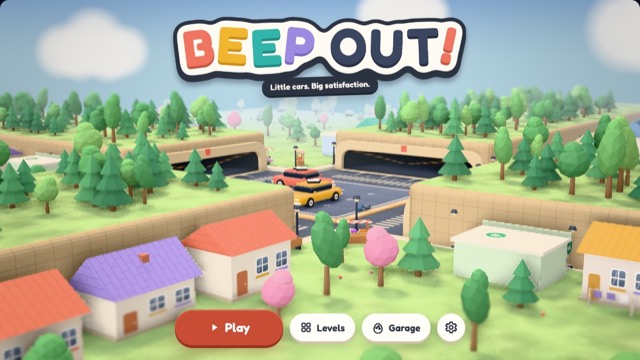
Played on a desktop browser on October 15, 2026. Screenshots are our own captures of the game.
BEEP OUT FAQ
How do you start a game of BEEP OUT?
Press the red Play button on the title screen. The Levels button next to it opens stage selection, and Garage and the gear button sit beside it for vehicles and settings.
Can you play BEEP OUT with a keyboard?
Yes. Besides clicking or tapping a car, the game's own controls let you use the arrow keys to select a vehicle and Enter to send it along its roof arrow.
What if I get stuck on a level?
The game offers Undo, Hint and Restart, so you can take back a move, get a nudge toward the right order, or start the board over.
Category: Puzzle. Game distributed by GameMonetize; it runs on the distributor's servers and may show its own ads.
More Puzzle games
 PLAY
PLAY PLAY
PLAY PLAY
PLAY PLAY
PLAY PLAY
PLAY PLAY
PLAY