
PS2 emulator for Mac: play in Safari, Chrome or Firefox
You can run a PS2 emulator on a Mac without installing anything: the browser build of the open-source Play! emulator runs in Safari, Chrome and Firefox. We tested all three on a Mac on October 15, 2026. You need a disc image of a game you own; no BIOS file is needed.
Open the browser emulatorCheck if your game works
What we tested on a Mac
Our test Mac has an Apple M5 chip and 24 GB of memory and runs macOS 26.6.2. We opened a self-test page that checks every browser feature the emulator needs, starts the emulator core the same way the real emulator does, and then runs a small PS2 test program. We did not boot a commercial game, because that needs a disc image; how well a particular game runs is covered on its game page and in the compatibility list.
| Browser | All required features | Emulator core started | Ran a PS2 program | All 16 buttons respond |
|---|---|---|---|---|
| Chrome 155 | ✓ Yes | ✓ Yes, in 1.6–1.8 s | ✓ Yes, 58.9–60 frames per second | ✓ Yes |
| Safari 26.6.2 | ✓ Yes | ✓ Yes | ✓ Yes, 59–60 frames per second | Not tested yet |
| Firefox 158 | ✓ Yes | ✓ Yes, in about 1.9 s | ✓ Yes, 58.9–60 frames per second | ✓ Yes |
| Edge | Not tested yet | |||
"All required features" means cross-origin isolation, SharedArrayBuffer, WebGL2, and WebAssembly threads and BigInt. Chrome results come from the live site with the browser cache disabled (core start: three runs; frame rate: two runs of five one-second samples). Firefox results come from one run on the live site. Safari was tested on a local copy of the site served with the same security headers as the live site, so its timing is not shown.
How we tested without a game disc
Booting a commercial game needs a disc image, so we wrote a tiny PS2 program of our own and built it with the open-source PS2SDK and gsKit tools. It draws a moving bar and 16 boxes, one for each digital button on the PS2 controller, and a box turns green while its button is held. The emulator runs it like any PS2 program, so it shows whether the emulator starts, how steadily it draws frames, and whether every key reaches the virtual controller.
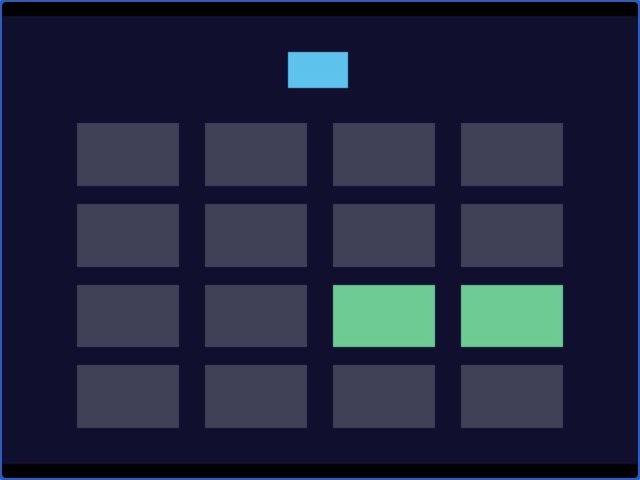
That test caught a real problem. In the original Play!.js browser build, the number keys mapped to L1, L2, L3, R1, R2 and R3 did nothing, because browsers report those keys under a different name than the one the emulator expected. We fixed it in the build this site uses, and the test above confirms all 16 buttons now respond.
Loading from a disc image
Games are loaded from a disc image, so we also built test disc images of our own: a standard ISO file that boots a second small program from the disc, plus filler data with markers at known places. We picked them with the emulator's normal file button in Chrome on a Mac (October 15, 2026):
- The disc boots. The program started from the image about 0.3 seconds after the file was picked, for a 4.7 MB image and for a 4.6 GB one alike, so the browser does not read the whole file before starting.
- Large images work. On the 4.6 GB image (the size of a full single-layer DVD), data stored more than 4.5 GB into the file came back correct, and Chrome's memory use rose by only about 200–300 MB.
- Reading speed. Reading 256 MB from the image in a row took about 29 seconds, roughly 8.7 MB per second on our machine.
- Nothing is uploaded. The browser made no network requests at all while the image was being read.
The small test image also booted and passed its checks in Firefox 158 and Safari 26.6 on the same Mac, and in Chrome, Edge and Firefox on Windows 11.
A test disc shows that the disc-image path works. It does not show how a particular commercial game runs; for that, check the game's status in the compatibility list.
What the emulator needs from your browser
The Play!.js build uses several threads, so it needs SharedArrayBuffer, which browsers only allow on pages that are cross-origin isolated. Our emulator page is served with the headers that turn this on. It also draws the game with WebGL2 and relies on WebAssembly threads and BigInt support. Current versions of Safari, Chrome and Firefox on macOS provide all of these, as our test shows. If your browser is much older, update it first.
The emulator core is about 2.2 MB and only downloads after you pick a disc image, so opening the emulator page itself is quick.
Browser emulator controls
Play!.js is played with the keyboard. Its default layout maps the PS2 controller like this; the browser build sets up no gamepad bindings by default. Click the game screen once before you start: the emulator listens for key presses on its game screen, so keys only register while it has focus.
| PS2 controller | Keyboard |
|---|---|
| D-pad | Arrow keys |
| Left analog stick | T / F / G / H (up / left / down / right) |
| Right analog stick | I / J / K / L |
| Cross ✕ | Z |
| Circle ○ | X |
| Square □ | A |
| Triangle △ | S |
| L1 / L2 / L3 | 1 / 2 / 3 |
| R1 / R2 / R3 | 8 / 9 / 0 |
| Start | Enter |
| Select | Backspace |
Source: default bindings in the Play! source code (Source/ui_js/Main.cpp). Number keys are read from the top row, not the numeric keypad.
Other ways to play PS2 games on a Mac
- PCSX2: the long-running desktop PS2 emulator has an official macOS build; its latest stable release, v2.8.2 (September 2026), includes one. Its README states that a BIOS dump from a legitimately owned PS2 console is required. See pcsx2.net.
- Play! desktop app: the same Play! project offers a native macOS build on its downloads page.
The browser emulator is the quickest to try, since there is nothing to install. The Play! project describes its browser build as an experiment, so if a game you care about runs poorly in the browser, a desktop emulator is the next step.
On an iPhone or iPad? See our iPhone test.
PS2 emulator for Mac FAQ
Is there a PS2 emulator for Mac that runs in the browser?
Yes. The browser build of the open-source Play! emulator runs in Safari, Chrome and Firefox on a Mac. In our test on October 15, 2026, all three browsers passed every requirement the emulator checks for, started its core and ran a PS2 test program at about 60 frames per second. You need a disc image of a game you own; no BIOS file and no install are needed.
Does it work on an Intel Mac?
We have only tested a Mac with an Apple M5 chip. The emulator needs the same browser features on any Mac (cross-origin isolation, SharedArrayBuffer, WebGL2 and WebAssembly threads), and those come from the browser rather than the chip, but we have not run it on an Intel Mac ourselves.
Can I use a controller with the browser emulator on Mac?
Not by default. The Play!.js browser build sets up keyboard bindings only, so you play with the keyboard. Click the game screen first so it receives your key presses.
Which is better on a Mac, the browser emulator or PCSX2?
They suit different needs. The browser emulator needs no install and no BIOS, but the Play! project calls its browser build an experiment, so games can run worse than in a desktop app. PCSX2 is a full desktop emulator with an official macOS build; it requires a BIOS dump from a PS2 console you own.
Is the browser PS2 emulator free on Mac?
Yes. It is free and needs no account. The disc image you pick is read inside your browser and is never uploaded.
Sources: our own test (October 15, 2026); Play! build settings and default key bindings in the Play! source code; PCSX2 README and releases; Play! downloads page.