
Draw to Help

Every picture in Draw to Help tells a small story, and something is always missing. Maybe a hungry dog needs a snack or a cat is stuck in the rain. Your job is to work out what would help, sketch it with your finger or mouse, and watch the characters react. The hand-drawn art is charming, hints appear when you are stuck, and no drawing skill is required.
How to play Draw to Help
- Look at each scene and figure out what is missing.
- Click or tap and drag to draw your solution.
- Watch how the characters react to your drawing.
- Use a hint if you get stuck.
What we saw when we played Draw to Help
When we opened Draw to Help on October 15, 2026, on a desktop browser, the game appeared as a framed panel on a white page, with a Unity logo and the title Draw to Help beneath it and a small full-screen button at the right. Inside, a cream-colored scene labeled Level 1 showed a hand-drawn backyard: a wooden doghouse with a bone on it, a fence, a leafy tree, hills, and a sad-looking spotted puppy sitting beside an empty blue bowl. A yellow speech bubble reading Draw something to help! pointed at the bowl, with a pencil hovering over it.
Two round buttons sat in the lower corners, a blue settings gear on the left and a lightbulb with a video badge on the right, which looks like the hint button. The bubble and pencil faded after our first click, leaving the clean scene. Our later clicks left only a tiny black dot where we pressed, and the frames showed no drawing stroke, no water in the bowl and no reaction from the dog. The game's own instructions say to click and drag to draw, and our blind clicks were not drags, so we did not see what a finished drawing does. The illustrations had a soft sketchbook look that was pleasant to study.
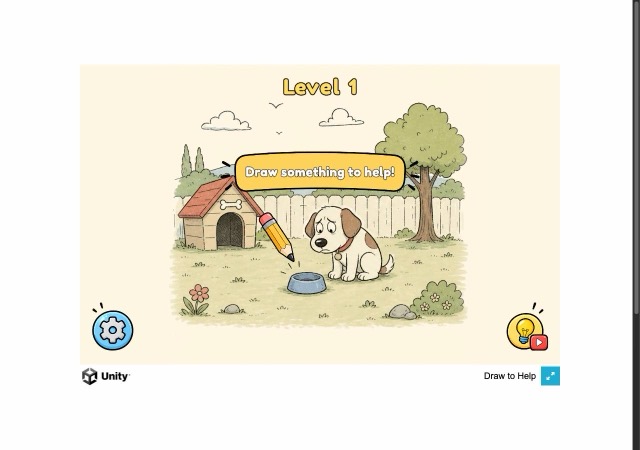
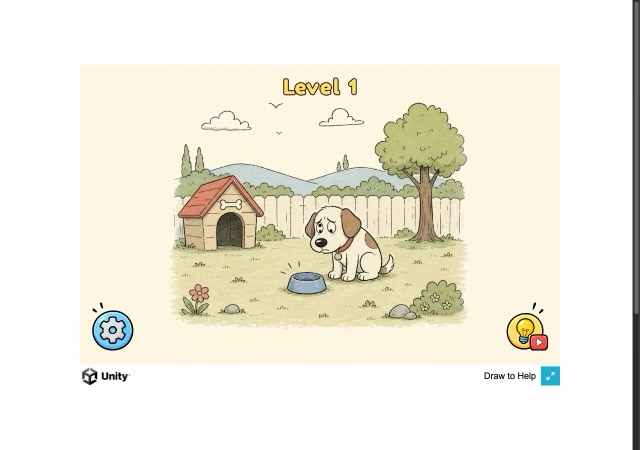
Played on a desktop browser on October 15, 2026. Screenshots are our own captures of the game.
Draw to Help FAQ
How do you draw in Draw to Help?
Click and drag, or touch and drag, across the scene. Our first level asked us to draw something to help a puppy beside an empty bowl, and a tutorial pencil pointed at the bowl.
Is there a hint button in Draw to Help?
A lightbulb button with a small video badge sits in the lower right corner of the play area. The game's own text says hints are there for when you get stuck.
Does Draw to Help have levels?
Yes, the top of the screen was labeled Level 1. We only saw that first scene, so we cannot say how many levels there are.
Category: Puzzle. Game distributed by GameMonetize; it runs on the distributor's servers and may show its own ads.
More Puzzle games
 PLAY
PLAY PLAY
PLAY PLAY
PLAY PLAY
PLAY PLAY
PLAY PLAY
PLAY